What actually matters when choosing an AI coding tool
If you write code every day, the real question is not “which AI is smartest.” The more useful comparison is:
- does it work well in
VS Code - is
inline autocompletestrong - can it handle
agentic codingand multi-file refactors - is the terminal or CLI good
- do you stay in your current editor or switch to a separate IDE
- is the monthly price justified by your workflow
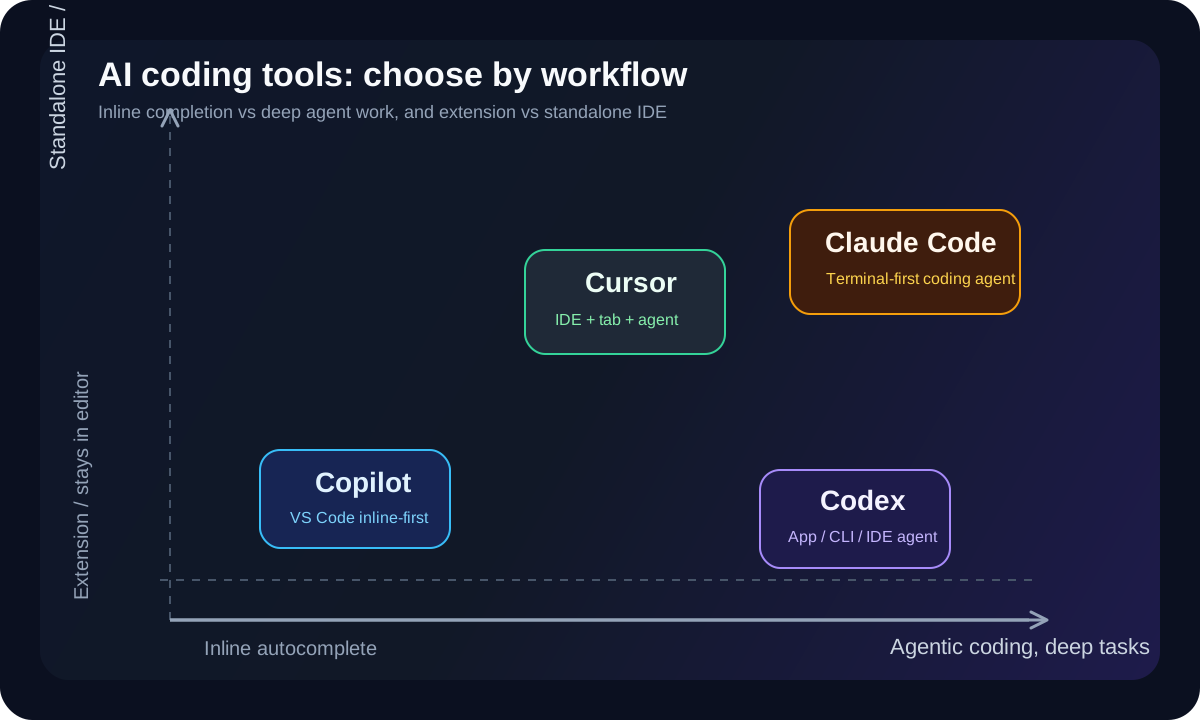
If you are deciding between Codex, Claude Code, Cursor, and GitHub Copilot, these are not four versions of the same product. They are optimized for different styles of programming work.
Short answer first
If you want the fast version:
want to stay in VS Code and get strong
inline autocompleteat a reasonable price:GitHub Copilotwant an AI-native IDE and are willing to switch editors:
Cursorwant a terminal-first coding agent that goes deep into a codebase:
Claude Codewant a strong coding agent connected to ChatGPT, the Codex app, CLI, and IDE extension:
Codex
No single tool wins everywhere. Each one is strongest in a different workflow.
Quick comparison table
| Tool | Product type | VS Code extension | Inline autocomplete | Standalone IDE | Biggest strength | Main weakness |
|---|---|---|---|---|---|---|
Codex |
coding agent + app + CLI + IDE extension | Yes | not its main focus | app, but not a standalone IDE like Cursor | large tasks, review, multi-surface workflows | not the first choice if you mainly want line-by-line autocomplete |
Claude Code |
terminal-first coding agent + editor integration | Yes | not the main focus | No | deep terminal workflows, strong agent behavior | not the obvious choice for autocomplete-first usage |
Cursor |
AI-native IDE | not mainly an extension, but a separate IDE | Yes, very strong | Yes | tab completion + agent in one place | requires switching away from stock VS Code |
GitHub Copilot |
extension + chat + agent + GitHub integration | Yes | Yes, very strong | No | easiest VS Code fit, lower entry price | deep agentic coding is not its clearest native strength |
1. When Codex makes the most sense
According to OpenAI’s official positioning, Codex is a coding agent built for end-to-end work such as features, refactors, migrations, review, and automation. OpenAI also documents separate surfaces for the CLI, IDE extension, app, worktrees, automations, and local environments.
The practical takeaway is:
- Codex fits larger tasks, not just single-line suggestions
- it is more about agent workflows than “type and autocomplete every line”
- the IDE extension works in
VS Code,Cursor,Windsurf, and other VS Code-compatible editors
Codex strengths
- strong for handing off a larger coding task
- connected to
ChatGPT, theCodex app, and theCLI - extension support exists for
VS Codeand VS Code forks - good if you already pay for ChatGPT and want one ecosystem
Codex weaknesses
- not the first tool to buy if your main goal is
inline autocomplete - better suited to
agent + review + larger tasksthan pure completion speed - pricing depends on the broader ChatGPT/Codex plan rather than a simple standalone coding plan
Codex pricing
According to the official Codex Pricing page, Codex is included in:
FreeGoPlusProBusinessEnterprise
The main differences are usage and model access:
Free: very limited trial accessPlus: expanded Codex usagePro: much higher usage, includingGPT-5.5 Pro
For individual developers, the practical interpretation is:
- if you already pay for
ChatGPT PlusorChatGPT Pro, you already have a path into Codex - Codex is more compelling when you want a stronger coding agent, not just code completion
2. When Claude Code makes the most sense
If you say Claude for programming, it helps to separate:
Claudeon the web or desktop for chatClaude Codefor actual software development workflows
According to Anthropic’s official product page, Claude Code is heavily positioned around:
- terminal integration
- editor integration
- VS Code
- JetBrains
Anthropic’s own presentation makes it clear that Claude Code starts from the terminal and then integrates into the editor.
Claude Code strengths
- excellent if you like terminal-driven work
- strong for deep codebase tasks
- native extensions for
VS Code,Cursor,Devin Desktop, andJetBrains - a good fit for reading repos, running commands, changing many files, and validating work
Claude Code weaknesses
- if you want “open VS Code and get excellent autocomplete immediately,” this is not its clearest strength
- the official messaging is much more
coding agentthanautocomplete-first - the personal paid plan costs more than Copilot Pro if your usage is relatively light
Claude Code pricing
According to Claude pricing, as of June 16, 2026:
Free:0 USDPro:17 USD/monthwith annual billing, or20 USD/monthbilled monthlyMax: from100 USD/month
Anthropic’s pricing page explicitly says Pro includes Claude Code.
When to choose Claude Code
Claude Code is a better fit if:
- you work heavily in the terminal
- you want deep agent behavior instead of just line suggestions
- you use
VS CodeorJetBrainsbut prefer a terminal-first model
3. When Cursor makes the most sense
Cursor is different from the rest in one critical way:
- it is not just an extension
- it is a standalone IDE
In practical terms, choosing Cursor means accepting a move to a different editor experience built around AI.
Cursor’s official site emphasizes:
AgentCursor CLIComposercontext-aware completionsmulti-agent collaboration
Cursor strengths
- very strong
Taband completion experience inside the IDE - agent and editor live in one product
- good if you want an “AI-native IDE” rather than retrofitting AI into an older workflow
- supports
Rules,MCPs,skills,hooks, cloud agents, and Bugbot
Cursor weaknesses
- switching editors is the biggest cost
- some teams standardized on stock VS Code or JetBrains may not want to move
- it can feel like too much if you only want lightweight autocomplete
Cursor pricing
According to Cursor’s official pricing page:
Hobby: free, withlimited Agent requestsandlimited Tab completionsPro:20 USD/monthTeams:40 USD/user/monthEnterprise: custom
Cursor also lists for Pro:
- access to frontier models
MCPs,skills, andhooks- cloud agents
When to choose Cursor
Cursor is a better fit if:
- you are willing to switch IDEs
- you want both
inline autocompleteand anagentin one place - you prefer an AI-native editor experience
4. When GitHub Copilot makes the most sense
If your goals are:
- install quickly
- stay in
VS Code - get strong autocomplete
- have chat in the editor
- keep pricing relatively reasonable
then GitHub Copilot is still the easiest recommendation for many developers.
According to GitHub, Copilot is available as an extension for:
Visual Studio CodeVisual StudioJetBrainsVimNeovimAzure Data Studio
GitHub also explicitly says that inline suggestions are available broadly, while chat is currently available in VS Code, JetBrains, and Visual Studio.
GitHub Copilot strengths
- strong
inline completion - especially comfortable in
VS Code - low friction compared with switching to Cursor
- relatively approachable personal pricing
- connected to GitHub, PRs, code review, and cloud agent workflows
GitHub Copilot weaknesses
- if you need a very deep long-running agent across a large codebase, it is not always the first tool people reach for
- it is less “AI-native IDE” than Cursor
- its clearest strength is still being a coding companion inside existing editors
GitHub Copilot pricing
According to GitHub’s official pricing page, as of June 16, 2026:
Free:0 USDPro:10 USD/user/monthPro+:39 USD/user/monthMax:100 USD/user/month
GitHub Docs also says:
Freeincludes2000 completionsand50 chat requestsProincludesunlimited code completion and next edit suggestionsProincludes access to3rd party agents, includingClaude CodeandCodex
That last point matters: Copilot is no longer just competing with other agents. It can also become the place where you invoke them.
So which tool is best for VS Code inline autocomplete
If the specific requirement is:
- already using
VS Code - want fast inline suggestions
- do not want to change workflow much
then I would rank them like this:
GitHub CopilotCursorif you are willing to switch to its IDECodexandClaude Codeif your main goal is agent workflows, not autocomplete
Why:
- GitHub Copilot is very clearly positioned around code suggestions and next edit suggestions
- Cursor has strong
Taband completion behavior, but you must move to its IDE - Codex and Claude Code are strongest in other areas
If you need deeper agentic coding, which one should you choose
If your work is more about:
- reading many files
- running commands
- refactoring across many places
- handling long tasks
- reasoning and validating across multiple steps
then the split looks more like this:
Codex: strong if you want agent workflows tied to ChatGPT, the app, CLI, and IDE extensionClaude Code: strong if you want terminal-first deep code workCursor: strong if you want everything inside one AI-native IDECopilot: good as a balance point, but not the clearest choice for very deep agent workflows
What to choose for each type of developer
1. Solo developer already using VS Code and wants immediate productivity
Choose:
GitHub Copilot Pro
Why:
- lowest practical personal entry cost
- easy VS Code setup
- inline completion is a real strength
2. Developer who likes the terminal and wants a deeper coding agent
Choose:
Claude Code
Why:
- terminal-first workflow
- editor integration exists, but the product does not force you to live entirely inside the editor
3. Developer willing to switch IDEs for the strongest all-in-one AI coding experience
Choose:
Cursor
Why:
- strong at both completion and agent workflows
- but the cost is moving to its IDE
4. Developer already paying for ChatGPT and wanting stronger OpenAI coding-agent workflows
Choose:
Codex
Why:
- no need to buy a completely separate tool if you are already in the right ChatGPT plan
- better fit for larger tasks, review, and agent workflows
Conclusion
If I had to compress it into one paragraph:
- best autocomplete while staying in VS Code:
GitHub Copilot - best AI-native IDE:
Cursor - best terminal-first coding agent:
Claude Code - best ChatGPT/OpenAI coding-agent path:
Codex
For most developers already living in VS Code, the most practical starting point is:
GitHub Copilot Proif price and autocomplete matter mostCursorif you are ready to change IDEsClaude CodeorCodexif your work is moving beyond line suggestions into genuineagentic coding
Pricing and usage limits change quickly, so you should still verify the official pricing pages at the time you read this.