When a Redis queue is the right tool
Not every task should run inside the HTTP request itself. Sending emails, generating thumbnails, syncing webhooks, calling third-party APIs, or exporting files usually have the same problems:
- They take longer than the user should wait
- They fail because of external dependencies
- If the request times out, the work may be lost
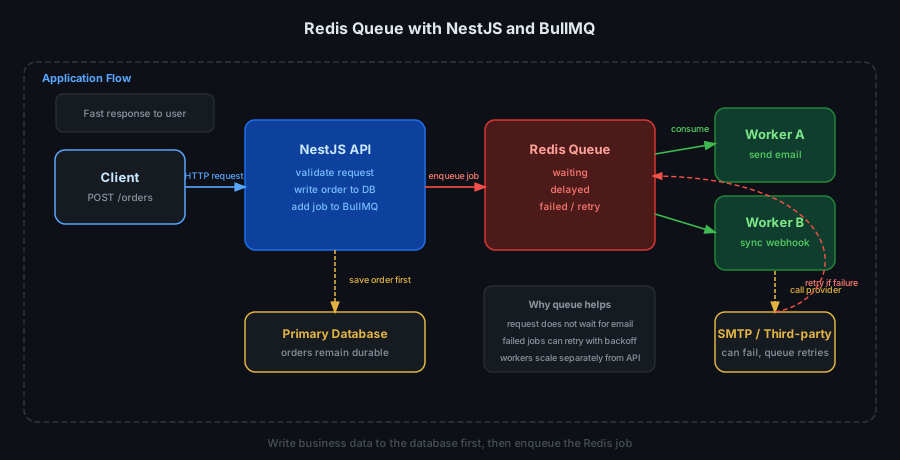
That is where a queue helps. Your NestJS API accepts the request, validates input, and pushes a job into Redis. A worker then processes that job asynchronously in the background.
Why Redis works well as a queue backend
Redis is a practical fit for queues because:
- It is in-memory and very fast for push/pop operations
- It has data structures that map well to queue workflows
- BullMQ adds delayed jobs, retries, and backoff on top
- Multiple workers can consume from the same queue to scale horizontally
Redis should not replace your business database. Use it for temporary job state, while important business data stays in PostgreSQL, MySQL, or another durable store.
Typical flow
Take an order confirmation email as an example:
- The user creates an order through a NestJS API
- The API writes the order to the database
- The API adds a
send-order-emailjob to a Redis queue - A worker consumes the job, renders the template, and sends the email
- If SMTP fails temporarily, the job retries with backoff
That keeps the order creation request fast and stable, while email delivery happens a few seconds later without blocking the user.
Installing BullMQ in NestJS
npm install @nestjs/bullmq bullmq ioredis
Register BullModule in your root module:
import { Module } from '@nestjs/common';
import { BullModule } from '@nestjs/bullmq';
import { OrdersModule } from './orders/orders.module';

@Module({
  imports: [
    BullModule.forRoot({
      connection: {
        host: process.env.REDIS_HOST || 'localhost',
        port: parseInt(process.env.REDIS_PORT || '6379', 10),
        password: process.env.REDIS_PASSWORD,
        keepAlive: 30000,
        connectTimeout: 10000,
        maxRetriesPerRequest: 3,
      },
      defaultJobOptions: {
        removeOnComplete: 1000,
        removeOnFail: 3000,
        attempts: 5,
        backoff: {
          type: 'exponential',
          delay: 5000,
        },
      },
    }),
    OrdersModule,
  ],
})
export class AppModule {}
Registering a queue and producing jobs
import { Module } from '@nestjs/common';
import { BullModule } from '@nestjs/bullmq';
import { OrdersService } from './orders.service';
import { OrdersController } from './orders.controller';
import { OrderEmailProcessor } from './order-email.processor';

@Module({
  imports: [
    BullModule.registerQueue({
      name: 'order-email',
    }),
  ],
  controllers: [OrdersController],
  providers: [OrdersService, OrderEmailProcessor],
})
export class OrdersModule {}
Inside the order service:
import { Injectable } from '@nestjs/common';
import { InjectQueue } from '@nestjs/bullmq';
import { Queue } from 'bullmq';

@Injectable()
export class OrdersService {
  constructor(
    @InjectQueue('order-email')
    private readonly orderEmailQueue: Queue,
  ) {}

  async createOrder(payload: {
    orderId: string;
    customerEmail: string;
    total: number;
  }) {
    // 1. Save the order to the database here

    // 2. Enqueue the background job
    await this.orderEmailQueue.add(
      'send-order-email',
      {
        orderId: payload.orderId,
        customerEmail: payload.customerEmail,
        total: payload.total,
      },
      {
        jobId: `order-email:${payload.orderId}`,
      },
    );

    return {
      success: true,
    };
  }
}
The jobId helps prevent duplicate jobs when the same order is submitted more than once.
Processing jobs in a worker
import { Injectable, Logger } from '@nestjs/common';
import { Processor, WorkerHost } from '@nestjs/bullmq';
import { Job } from 'bullmq';

@Processor('order-email')
@Injectable()
export class OrderEmailProcessor extends WorkerHost {
  private readonly logger = new Logger(OrderEmailProcessor.name);

  async process(
    job: Job<{
      orderId: string;
      customerEmail: string;
      total: number;
    }>,
  ) {
    this.logger.log(`Processing job ${job.name} for order ${job.data.orderId}`);

    if (job.name === 'send-order-email') {
      await fakeSendEmail(job.data.customerEmail, job.data.orderId, job.data.total);
    }

    return {
      delivered: true,
    };
  }
}

async function fakeSendEmail(email: string, orderId: string, total: number) {
  console.log(`Send email to ${email} for order ${orderId}, total=${total}`);
}
If fakeSendEmail throws, BullMQ retries according to the configured attempts and backoff.
Delayed jobs, retries, and concurrency
Queues are not only for fire-and-forget.
Delayed jobs
For example, send a payment reminder after 30 minutes:
await this.orderEmailQueue.add(
  'payment-reminder',
  { orderId, customerEmail },
  {
    delay: 30 * 60 * 1000,
  },
);
Retries with backoff
Useful when calling flaky external services like SMTP providers, webhook endpoints, or OCR APIs.
await this.orderEmailQueue.add(
  'sync-webhook',
  { orderId },
  {
    attempts: 6,
    backoff: {
      type: 'exponential',
      delay: 3000,
    },
  },
);
Limiting worker concurrency
If the downstream system can only handle a small number of concurrent requests:
import { Processor, WorkerHost } from '@nestjs/bullmq';

@Processor('order-email', {
  concurrency: 5,
})
export class OrderEmailProcessor extends WorkerHost {
  async process(job: Job) {
    // ...
  }
}
Good use cases for Redis queues
- Email, SMS, and push notifications
- Retry-safe webhook processing
- Image resizing, PDF generation, CSV exports
- Syncing data to CRM, ERP, or shipping partners
- Moving heavy work out of your main API request path
If the task needs high throughput but does not need synchronous real-time completion, a Redis queue is usually a strong pragmatic choice.
Common mistakes
1. Enqueueing before writing business data
Do not add the job first and write to the database later. If the database write fails but the job is already queued, the worker may process missing or inconsistent data.
Safer order:
- Write to the database first
- Commit successfully
- Enqueue the job after that
2. No idempotency
Queues and webhooks both retry. If your worker is not idempotent, a retried job can:
- Send the same email twice
- Deduct stock twice
- Call the partner API twice
Use jobId, unique keys, or a processed-state check in the database.
3. Never cleaning up old jobs
If completed jobs are kept forever, Redis memory will grow over time. removeOnComplete and removeOnFail are close to mandatory.
4. Sharing one Redis for everything without controls
If the same Redis instance is used for cache, queues, and sessions, watch memory pressure and eviction policy closely. Queue data being evicted is a painful bug to debug.
Production notes
- Enable
keepAlivefor Redis connections, especially on ElastiCache - Log
completed,failed, andstalledevents - Monitor queue depth:
waiting,active,failed - Run workers as separate processes if load grows
- Do not treat Redis as the only durable source of business data
If the queue is on a critical path, add metrics or a dashboard so you can see backlogs before users report symptoms.
Conclusion
Redis is not just a cache. In many NestJS systems, its most practical value is in queues: moving heavy work out of request handlers, retrying safely when external dependencies fail, and scaling workers independently from the API.
If your controllers still send emails, call partner webhooks, or export files directly inside the request, that is usually a strong sign the work should move into a Redis queue with BullMQ.