When this upgrade approach makes sense
If you have an older NestJS service, for example NestJS 7, and want to move it to NestJS 11, the easiest way to damage the project is:
- upgrade everything in one shot
- ask AI to fix the code everywhere
- merge as soon as the build turns green
That approach often gives you:
- code that builds but shifts runtime behavior
- passing compile checks with broken business logic
- large diffs that mix framework changes with unrelated refactors
- no clear idea which step actually introduced the bug
This article takes the opposite path:
- use AI to reduce upgrade mistakes
- keep control on the developer side
- upgrade only what really needs to move
- and do not let AI silently rewrite business logic
I have used this approach to upgrade more than 10 large services from NestJS 7 to 11 without affecting the system behavior.
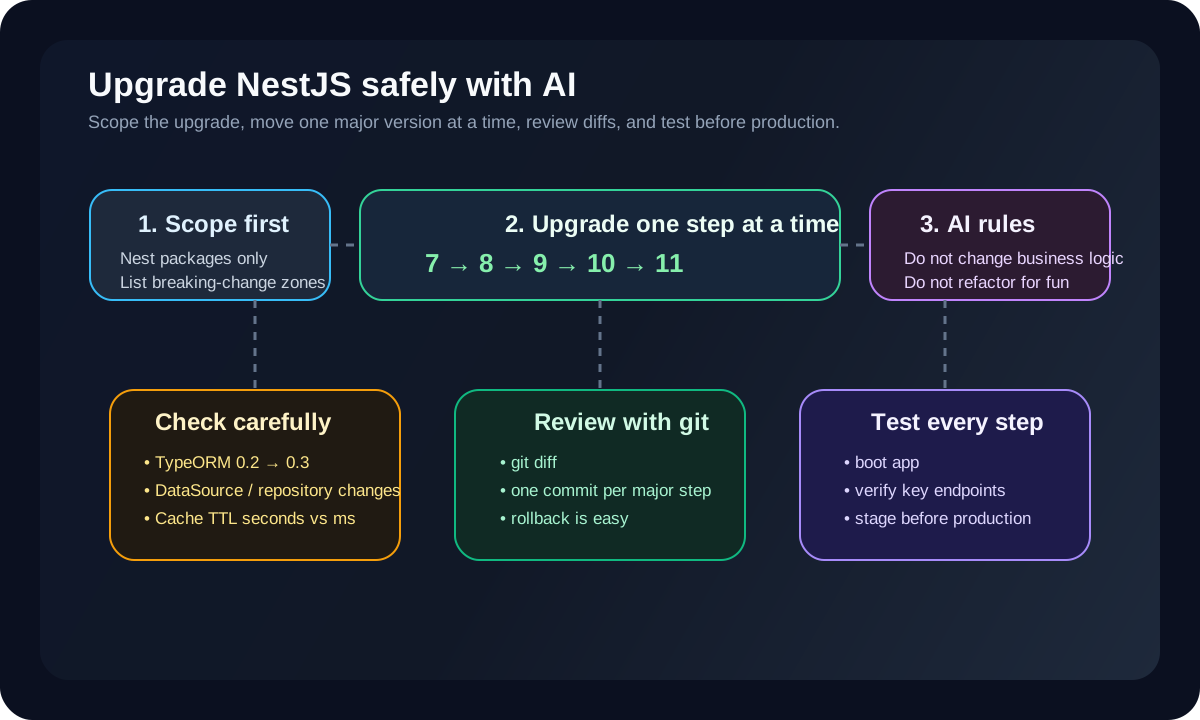
Short answer first
If you want the fast version:
- do not jump directly from
NestJS 7to11 - upgrade one major version at a time:
7 -> 8 -> 9 -> 10 -> 11 - before each step, list exactly which packages need to move
- tell AI to fix only what is necessary for the target version
- make AI inspect heavy breaking-change areas such as
TypeORM 0.2 -> 0.3 - always use
git diffor one commit per step to review changes - test after each major version before continuing
If you skip these three things:
- one-major-at-a-time upgrades
- git diff review
- testing after each step
then a stronger AI can actually make the upgrade more dangerous, not safer.
The right goal when you ask AI to upgrade NestJS
The goal is not:
- “upgrade this project to the latest version”
The correct goal is:
- upgrade only the necessary NestJS packages
- keep business logic unchanged
- do not refactor architecture unless required
- change only what breaks because of the target version
- explain which files changed and why
In other words:
- AI is a careful upgrade assistant
- not the architect of your system
Do not jump from NestJS 7 to 11 in one step
This is the most important rule.
If the project is currently on NestJS 7, move in this order:
7 -> 8- stabilize and test
8 -> 9- stabilize and test
9 -> 10- stabilize and test
10 -> 11
Why:
- each major version has its own breaking changes
- if you skip too many versions, the diff becomes huge
- AI will often touch extra code it did not need to touch
- when a bug appears, you no longer know which version boundary introduced it
Stepwise upgrades give you:
- smaller failure zones
- easier rollback
- cleaner diffs
- more meaningful testing
Before upgrading, list the packages that really matter
Do not let AI look at package.json and update the whole world.
Start by listing the real NestJS surface area:
@nestjs/common@nestjs/core@nestjs/platform-expressor@nestjs/platform-fastify@nestjs/testing@nestjs/swagger@nestjs/config@nestjs/microservices@nestjs/schedule@nestjs/cache-manageror anything still tied to old cache usage
Then list the surrounding packages that may need attention:
rxjsclass-validatorclass-transformerreflect-metadatatypescripttypeorm
Not every project needs to move all of them at once. But you need to know which packages are:
- core Nest packages
- Nest-adjacent packages
- non-Nest packages that still create upgrade risk
Packages that AI should inspect extra carefully
1. TypeORM 0.2.x -> 0.3.x
This is one of the biggest breaking-change zones in older Nest projects.
For example, with TypeORM 0.2.29 -> 0.3.x, you often need to change:
ConnectiontoDataSource- old custom repository patterns
- some repository injection patterns
- datasource configuration
- migration CLI setup
- some
findOneand query option syntax
The dangerous part is:
- AI may fix compile errors
- but still change query behavior or initialization behavior in subtle ways
So for TypeORM, the AI prompt needs to be strict:
- fix only the compatibility changes required for
0.3 - do not change business query intent
- if a query syntax must change, preserve runtime behavior
2. CacheModule and TTL behavior
Another easy place to introduce silent bugs is cache TTL.
According to the current Nest docs, many cache APIs use TTL in milliseconds. If your older project still assumes seconds, AI may keep the same numeric value while accidentally changing the meaning.
Example:
- old code assumes
60means 60 seconds - after the upgrade, that same
60may be interpreted as 60 milliseconds
This kind of bug is extremely easy to miss if you only look at compile output.
So for cache-related upgrades:
- force AI to find every place using
ttl - identify which places assume seconds and which expect milliseconds
- do not let it convert behavior silently
3. Swagger, validation, and decorator-related packages
Across several Nest major versions, packages like:
@nestjs/swaggerclass-validatorclass-transformer
can also affect:
- generated schemas
- decorator behavior
- request body transformation
- validation defaults
These are not always compile-time failures, but they are often API contract failures.
What to prepare before using AI
A safer flow looks like this:
- create a dedicated branch
- back up
package.jsonand the lock file - capture the current test state
- if automated tests are weak, prepare a manual smoke checklist
- commit the current state before touching anything
Example:
git checkout -b upgrade/nestjs-7-to-8
git add .
git commit -m "chore: snapshot before upgrading nestjs 7 to 8"
Only then should AI start helping with the upgrade.
How to prompt AI for this kind of work
Do not use a vague prompt.
A better prompt is something like:
This project is currently on NestJS 7.

The current goal is only to upgrade to NestJS 8.
Change only what is required for compatibility with the new version.
Do not change business logic.
Do not refactor architecture.
Do not rename functions, classes, or folders unless absolutely necessary.

First list:
1. which NestJS packages need upgrading
2. which adjacent packages may be affected
3. which breaking changes require manual review

Only after that should you propose the smallest possible diff.
If the project uses TypeORM or cache heavily, add:
This project uses TypeORM 0.2.x and older cache TTL assumptions.
Inspect breaking changes carefully around DataSource, repository APIs, migration config, and TTL behavior.
If runtime behavior is uncertain, mark it for manual review instead of guessing.
How to upgrade one major version at a time
Step 1: move from 7 to 8
At this step, the goal is:
- touch only what is necessary for
8 - do not think about
9,10, or11yet
Process:
- upgrade the target package versions
- reinstall dependencies
- let AI fix compile errors and required breaking-change updates
- review
git diff - run tests
- run a manual smoke test
- commit only when the step is stable
Example:
git checkout -b upgrade/nestjs-7-to-8
npm install
npm test
git diff
git add .
git commit -m "chore: upgrade nestjs from 7 to 8"
Step 2: only go to 9 after 8 is stable
This is where people get impatient.
If NestJS 8 just barely compiles but:
- tests are not finished
- cache behavior is not verified
- swagger output is not checked
- core database flows are not smoke-tested
then you should not move on.
The next major version should start only after:
- build is stable
- tests are stable
- core flows still work
- the previous step's diff has been reviewed
Repeat the same discipline for:
8 -> 99 -> 1010 -> 11
Always keep git on while AI is changing things
This is non-negotiable.
AI is fast, but it is also very capable of:
- changing imports unnecessarily
- reformatting unrelated code
- touching files outside the upgrade scope
- changing logic just to satisfy types
So force the process through git review.
At minimum, inspect:
- which files changed
- which packages changed
- which edits are just API replacements
- which edits may change runtime behavior
Useful commands:
git diff
git diff --stat
git status
If the diff is too large, do not merge it.
Tighten the scope and ask AI to redo the step more narrowly.
What needs careful manual review after AI finishes
After AI makes its changes, review these areas manually:
- bootstrap config
- global pipes, filters, and interceptors
- cache TTL
- database connection initialization
- repository logic
- migration commands
- auth guards
- swagger decorators
- custom decorators
- custom exception filters
These areas often:
- compile cleanly
- but still change runtime behavior
What to test after each step
Do not wait until NestJS 11 to test.
After each major version, verify:
- the app boots
- the health check works
- critical endpoints still return the expected shape
- cache still expires at the correct time
- key database queries still behave correctly
- auth and permission flows still work
- workers, cron jobs, and queues still run if the service uses them
CI helps a lot. But if automated coverage is limited, you still need:
- a manual smoke checklist
Production should be the last step, not the first green build
An upgrade is not successful just because:
npm run buildpasses
It is successful only when:
- the diff is reviewed
- the tests are reviewed
- the smoke test is done
- staging is stable
- production rollout is controlled
Using AI to upgrade NestJS while skipping staging or post-upgrade verification is asking for trouble.
What role AI should really play in this process
AI is very good at:
- reading compile errors
- suggesting new imports
- replacing old APIs with new ones
- identifying breaking-change zones
- highlighting packages that need review
But AI should not be allowed to:
- redesign the architecture
- merge services
- change business workflows
- declare a breaking change “safe” without evidence
The right setup is:
- AI helps with the mechanical upgrade
- the developer retains control over system behavior
Conclusion
If you want to upgrade NestJS 7 to 11 with AI and fewer mistakes, remember this:
- upgrade one major version at a time
- only upgrade the packages that really need to move
- isolate heavy breaking-change areas such as
TypeORMand cache handling - review every AI change with
git - test after every step
- only promote to production after staging and verification are stable
AI can make the process much faster.
But what actually protects your system is not AI by itself.
What protects your system is:
- a clear scope
- a clear diff
- clear tests
- and the discipline to move version by version